Seller Forums
user profile
Kelly_Amazon

Intro to Business Reports

Your Amazon Seller Central account gives you access to several business reports.

You Can Use The Reports To:
Help Identify Sales Trends
Recognize Your Top Performing Products
Discover New Opportunities To Grow Your Business

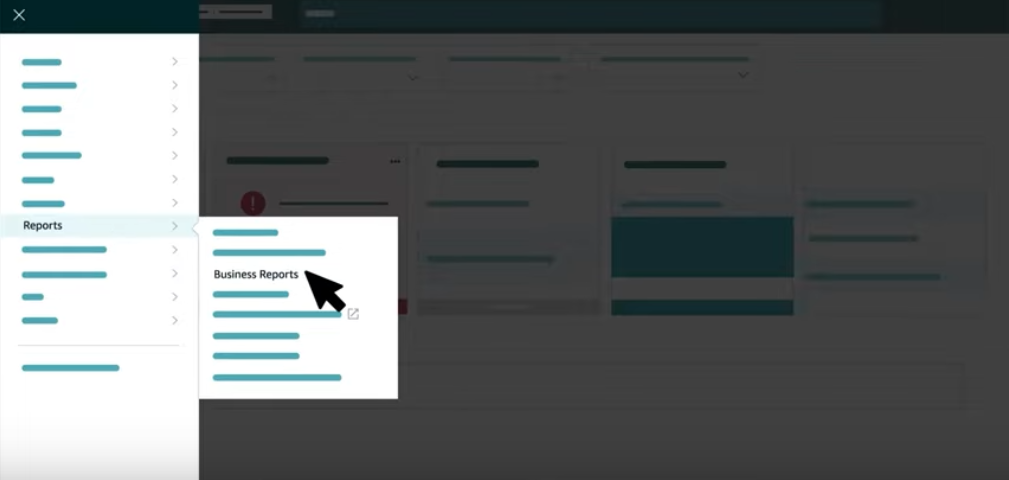
To Access - Seller Central Account>Menu>Reports>Business Reports
The Sales Dashboard provides a summary of your sales metrics.
The Sales Snapshot section displays your current sales and order performance.This is refreshed about once per hour.
The Compare Sales section can help you compare these numbers to your sales and order performance from yesterday, the same day last week and the same day last year.
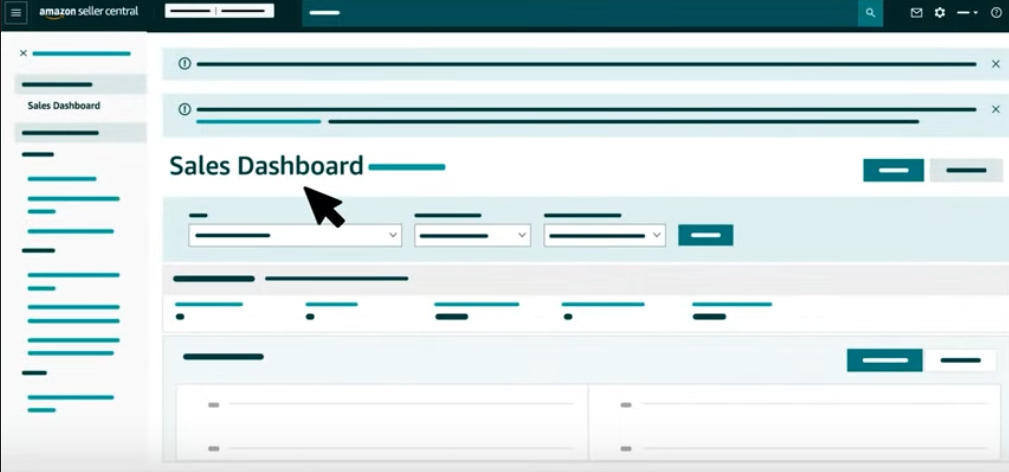
On the left side of the dashboard you will see reports categorized by date, ASIN and other categories.

Cick here to learn more about the reports offered, how to customize them for your business needs and how to use them effectively.
273 views
6 replies
50
Reply
user profile
Kelly_Amazon

Intro to Business Reports

Your Amazon Seller Central account gives you access to several business reports.

You Can Use The Reports To:
Help Identify Sales Trends
Recognize Your Top Performing Products
Discover New Opportunities To Grow Your Business

To Access - Seller Central Account>Menu>Reports>Business Reports

The Sales Dashboard provides a summary of your sales metrics.
The Sales Snapshot section displays your current sales and order performance.This is refreshed about once per hour.
The Compare Sales section can help you compare these numbers to your sales and order performance from yesterday, the same day last week and the same day last year.

On the left side of the dashboard you will see reports categorized by date, ASIN and other categories.

Cick here to learn more about the reports offered, how to customize them for your business needs and how to use them effectively.

50
273 views
6 replies
Reply
6 replies
Follow this discussion to be notified of new activity
user profile
Kelly_Amazon

Intro to Business Reports

Your Amazon Seller Central account gives you access to several business reports.

You Can Use The Reports To:
Help Identify Sales Trends
Recognize Your Top Performing Products
Discover New Opportunities To Grow Your Business

To Access - Seller Central Account>Menu>Reports>Business Reports

The Sales Dashboard provides a summary of your sales metrics.
The Sales Snapshot section displays your current sales and order performance.This is refreshed about once per hour.
The Compare Sales section can help you compare these numbers to your sales and order performance from yesterday, the same day last week and the same day last year.

On the left side of the dashboard you will see reports categorized by date, ASIN and other categories.

Cick here to learn more about the reports offered, how to customize them for your business needs and how to use them effectively.

273 views
6 replies
50
Reply
user profile
Kelly_Amazon

Intro to Business Reports

Your Amazon Seller Central account gives you access to several business reports.

You Can Use The Reports To:
Help Identify Sales Trends
Recognize Your Top Performing Products
Discover New Opportunities To Grow Your Business

To Access - Seller Central Account>Menu>Reports>Business Reports

The Sales Dashboard provides a summary of your sales metrics.
The Sales Snapshot section displays your current sales and order performance.This is refreshed about once per hour.
The Compare Sales section can help you compare these numbers to your sales and order performance from yesterday, the same day last week and the same day last year.

On the left side of the dashboard you will see reports categorized by date, ASIN and other categories.

Cick here to learn more about the reports offered, how to customize them for your business needs and how to use them effectively.

50
273 views
6 replies
Reply
user profile

Intro to Business Reports

by Kelly_Amazon

Your Amazon Seller Central account gives you access to several business reports.

You Can Use The Reports To:
Help Identify Sales Trends
Recognize Your Top Performing Products
Discover New Opportunities To Grow Your Business

To Access - Seller Central Account>Menu>Reports>Business Reports

The Sales Dashboard provides a summary of your sales metrics.
The Sales Snapshot section displays your current sales and order performance.This is refreshed about once per hour.
The Compare Sales section can help you compare these numbers to your sales and order performance from yesterday, the same day last week and the same day last year.

On the left side of the dashboard you will see reports categorized by date, ASIN and other categories.

Cick here to learn more about the reports offered, how to customize them for your business needs and how to use them effectively.

Tags:ASIN, Images
50
273 views
6 replies
Reply
6 replies
6 replies
Quick filters
Sort by
Follow this discussion to be notified of new activity